
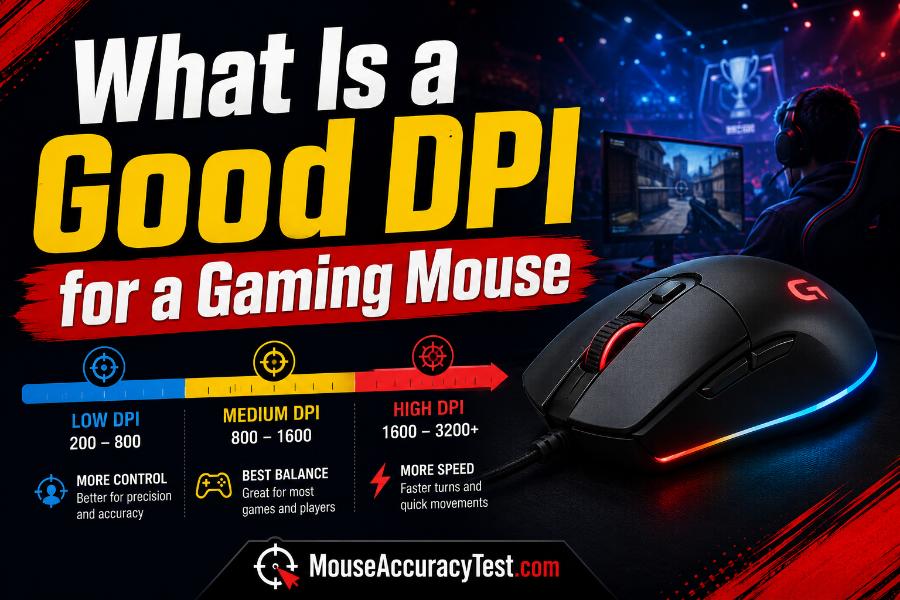
A common question among new and experienced players is, “What is a good DPI for a gaming mouse?” A practical answer is that many players start somewhere between 400 and 1600 DPI, then adjust the in-game sensitivity to create a comfortable effective speed. That range is not a rule, and values outside it can work well. The correct setting is the one that lets you make fine corrections, turn when necessary, and use the mouse without strain.
DPI cannot be evaluated alone. An 800-DPI mouse with high in-game sensitivity may feel faster than a 1600-DPI mouse with low sensitivity. Desk space, game genre, field of view, monitor setup, role, mouse grip, and personal control all affect the result. This guide explains how to choose a useful value and avoid settings decisions based only on marketing numbers or professional-player lists.
What DPI Actually Controls
DPI describes the number of movement counts reported for each inch the mouse travels. Higher DPI sends more counts over the same physical distance. With software settings unchanged, this makes the pointer or game camera move farther.
DPI does not directly measure accuracy, reaction speed, input lag, or gaming skill. A mouse advertising 26,000 DPI is not automatically more accurate than one used at 800 DPI. The maximum value mainly indicates the sensor’s available range. Most players choose a small portion of that range.
The final movement you experience comes from several layers: hardware DPI, operating-system scaling, acceleration, in-game sensitivity, scope multipliers, and sometimes field of view. A good setup treats these settings as a system rather than judging DPI by itself.
Why 400, 800, and 1600 DPI Are Common Starting Points
These values are common because many gaming mice support them cleanly, they are easy to remember, and they provide flexible sensitivity ranges in most games. At 400 DPI, small hand movements produce fewer counts, so players often use a higher in-game sensitivity. At 1600 DPI, more counts are available, so the in-game value can be lower.
Using a higher hardware DPI with proportionally lower in-game sensitivity can provide fine input granularity in some game engines. However, the practical difference may be small compared with the effects of frame rate, sensor quality, mouse control, and game settings. You should not abandon a comfortable value solely because a theoretical comparison favors another number.
Start with a common stage if you are unsure, but evaluate the physical turn distance and control. The number is a convenient foundation, not a performance ranking.
Understand eDPI and Effective Sensitivity
Within one game, effective DPI is often calculated by multiplying mouse DPI by in-game sensitivity. If you use 800 DPI and a sensitivity of 0.50, the eDPI is 400. If you change to 1600 DPI and 0.25 sensitivity, the eDPI remains 400, so the turn distance is often similar within that game.
eDPI is useful for comparing players or settings in the same title. It should not be compared directly between different games because sensitivity scales differ. An eDPI of 400 in one shooter does not necessarily feel like 400 in another.
A more physical comparison is centimeters per 360-degree turn, which measures how far the mouse must travel to rotate the camera once. Even then, field of view, zoom behavior, and game mechanics affect perceived speed. Use both eDPI and physical measurement as tools, not absolute definitions of comfort.
Good DPI for Tactical FPS Games
Tactical shooters often reward precise first shots, controlled angle clearing, and stable head-level crosshair placement. Many players choose a moderate hardware DPI and a relatively low effective sensitivity so small corrections are easier. Common starting hardware values include 400, 800, and 1600 DPI, adjusted with the game’s sensitivity.
The important test is whether you can track a slowly moving head, correct a small overflick, and turn far enough to clear close threats without repeatedly lifting the mouse. Large mouse pads make lower effective sensitivity easier to use. Limited desk space may require a faster setting.
Avoid selecting a very low sensitivity simply because competitive players use one. If you cannot turn comfortably, tense the shoulder, or hit the keyboard during normal play, the setting is not helping. Precision should not come at the cost of basic mobility.
Good DPI for Fast Arena and Movement Shooters
Arena shooters and fast movement games often require frequent tracking, vertical adjustments, quick turns, and target switching. A somewhat faster effective sensitivity may be comfortable, although strong players use a wide range. The ability to follow an opponent smoothly is more important than the hardware DPI number alone.
Test sustained tracking at close and medium range. If you constantly run out of pad while following a fast target, increase effective sensitivity. If the crosshair shakes across the opponent and every correction overshoots, reduce it. Practice vertical movement because jump pads, flying abilities, and elevation changes can expose weaknesses hidden by horizontal drills.
Use a DPI stage that works reliably with your mouse and set the game sensitivity around the physical movement you need. Keep the setting stable long enough to develop smooth control.
Good DPI for Battle Royale Games
Battle royale games combine close fights, medium-range tracking, long-range shots, inventory management, and large camera turns. A balanced sensitivity is usually more useful than a setting optimized for one narrow situation. Many players stay within common hardware stages and tune separate scope multipliers when the game allows it.
Check how the setup behaves during a close-range turn, a controlled rifle spray, and a long-range micro-adjustment. If scoped aim is too fast while hip-fire feels correct, adjust the aim-down-sights or scope sensitivity instead of changing the base DPI immediately.
Vehicle controls, map navigation, and looting interfaces may use different sensitivity layers. Record them separately. A good base DPI should make the overall game manageable, while specialized multipliers solve individual modes.
Good DPI for MOBA, RTS, and Strategy Games
MOBA and real-time strategy games rely on fast cursor movement across the screen, accurate selection, camera control, and repeated clicks. A higher desktop-style sensitivity can reduce travel across a large or high-resolution display. Hardware DPI values such as 800 to 1600 or higher may be comfortable, but the correct setting depends on monitor size and interface scaling.
Test edge scrolling, selecting small units, clicking ability icons, and moving between the minimap and the main action. A setting is too high if you frequently miss small interface targets. It is too low if crossing the screen requires repeated lifts or large arm movements that slow commands.
Pointer acceleration can change the relationship between slow and fast movement. Some strategy players like it, while others prefer predictable one-to-one control. Consistency and comfort are more important than following FPS-specific advice.
Good DPI for RPGs, MMOs, and Casual Games
RPGs and MMOs often combine camera control, menu navigation, hotbars, targeting, and long sessions. Comfort matters as much as mechanical precision. A moderate to higher DPI can reduce arm movement, especially on large displays, while a lower in-game camera sensitivity can prevent the view from feeling uncontrolled.
Use separate interface and camera settings when the game supports them. The pointer may need to move quickly across inventory panels while the camera should rotate more slowly. Extra mouse buttons and profile switching can be useful, but avoid creating a setup so complex that accidental changes become common.
For casual games, there is no reason to use a competitive-shooter sensitivity if it feels uncomfortable. Choose a value that supports relaxed, accurate interaction over the length of your normal session.
Does Monitor Resolution Change the Best DPI?
A higher-resolution desktop contains more pixels, so the same hardware DPI and pointer-speed settings may require more physical movement to cross the screen. Users moving from 1080p to 1440p or 4K sometimes increase DPI or operating-system pointer speed for desktop comfort.
In games that use raw input for camera rotation, screen resolution may not change the physical turn distance in the same way. Field of view, aspect ratio, rendering, and game sensitivity are more relevant. The desktop cursor and the in-game camera should therefore be evaluated separately.
Display scaling enlarges interface elements and changes how the desktop feels. Before changing DPI, confirm the operating-system scaling and game input method. A multi-monitor setup may justify a faster desktop profile even when the game profile remains unchanged.
Mouse Pad Size, Grip, and Arm Movement
A large pad supports lower effective sensitivity because the mouse can travel farther without hitting an obstacle. A small pad places a practical limit on low settings. Measure the usable area after accounting for the keyboard and other objects, not only the advertised pad size.
Wrist aim generally handles small and medium movements, while arm aim helps with larger turns. Many players combine arm, wrist, and finger movement. Mouse shape and grip influence how easily each movement can be performed. A setting that works for one grip may feel tiring with another.
Choose a DPI and sensitivity that allow a relaxed grip. If you squeeze the mouse to control a very fast setting or repeatedly strain the shoulder with a very slow one, adjust the setup. Comfort is part of consistency.
How Polling Rate Relates to DPI
Polling rate describes how often the mouse reports data to the computer, commonly measured in hertz. DPI describes how many movement counts are generated per inch. They are separate settings, although both affect the input stream.
A higher polling rate can provide more frequent updates, but it may use more CPU resources and does not replace a suitable DPI. Use a rate supported reliably by the mouse, USB connection, computer, and game. If a very high rate causes stutter or unstable frame times, a lower stable rate can feel better.
When comparing DPI settings, keep polling rate constant. Changing both at once makes it harder to identify why movement feels different.
A Step-by-Step Method to Find Your Best DPI
Begin with a stable value such as 800 DPI and set operating-system acceleration and pointer speed to known positions. In your main game, choose a sensitivity that allows a comfortable full turn within your usable pad space. Do not optimize only for the fastest possible turn.
Test three actions: a large turn to a target behind or beside you, smooth tracking on a moving target, and a small correction onto a distant target. If large turns are difficult but small corrections are easy, raise effective sensitivity slightly. If large turns are easy but micro-adjustments are unstable, lower it.
Change by 10 to 20 percent, not by several hundred percent. Use the setting for multiple sessions and record the result. Once you find a balanced range, stop changing it after individual bad games. Focus on crosshair placement, movement, and practice.
Common DPI Myths
One myth is that maximum DPI equals maximum accuracy. In reality, maximum DPI is a capability, not a recommended everyday value. Another myth is that every professional player uses 400 DPI. Competitive players use several hardware stages and many different effective sensitivities.
A third myth is that changing DPI destroys muscle memory permanently. Players can adapt, especially when the change is controlled. However, constant switching makes learning harder because the same movement produces different results. Stability helps practice become repeatable.
It is also misleading to compare DPI without in-game sensitivity. Two players using 800 DPI can have completely different turn speeds. Always consider the complete setup.
Frequently Asked Questions
Is 800 DPI good for gaming? Yes, 800 DPI is a practical starting point supported by many mice and games. Its success depends on the in-game sensitivity and your control.
Is 1600 DPI too high? Not necessarily. With a lower in-game sensitivity, 1600 DPI can produce the same effective turn speed as a lower hardware value.
Is 400 DPI better for FPS games? It can work well, but it is not inherently better. Choose the combination that supports accurate corrections and comfortable turning.
Should I use the highest DPI my mouse supports? Usually no. Extreme values are rarely necessary for normal gaming and may make software sensitivity difficult to tune comfortably.
How often should I change DPI? Change it when a repeated practical problem shows the current setup is unsuitable. Once balanced, keep it stable and improve through practice rather than frequent settings experiments.
Conclusion
For most players asking what is a good DPI for a gaming mouse, 400 to 1600 DPI is a sensible testing range, with 800 DPI as an easy starting point. The value is not a rule. The correct choice depends on in-game sensitivity, pad space, monitor setup, game genre, and physical comfort.
Judge the complete effective sensitivity through large turns, tracking, and micro-adjustments. Make small changes, record your settings, and stay consistent once the setup works. A comfortable, predictable configuration will support improvement far more than chasing the highest number or copying another player’s profile.